Tag: low vision

  • Cheap, Low-Tech Home Accessibility When You’re Blind

    Cheap, Low-Tech Home Accessibility When You’re Blind

    A lot of what makes my house accessible for me would not look like much to anyone else.

    I use plenty of technology. I like smart devices when they actually make my life easier. But a lot of the most reliable accessibility in my house is cheap, low-tech, and already sitting in a drawer somewhere.

    It is not always a smart device that speaks to me. Or even a braille label. Sometimes it is a rubber band around the conditioner so I do not wash my hair twice and condition it zero times. Often it is a container that does not match the others on purpose.

    The uniform pantry aesthetic will never be my reality. A beautiful row of identical containers may look organized, but if they all feel the same, I am going to mix them up eventually.

    I once mistook leftover mashed potatoes for sour cream.

    Ten out of ten, do not recommend.

    If It All Feels the Same, I’ll Mix It Up

    That is why I use bump dots, rubber bands, odd containers, and routine.

    Putting things back is its own thing. It is not just a good habit. It is how I make sure I can find the thing again. A charger moved to a “better” spot. An ingredient set down somewhere creative.

    That can stop a project cold.

    I have heard whispered rumors that it is possible to train an entire household to put everything back exactly where it belongs. I cannot verify this. So I build systems around the things that are mine to manage.

    Smart Is Nice. Independent Is Better.

    I am not anti-smart-device. I like them when they make my life easier.

    My thermostat works well. The app is accessible, and I can control it from my phone. My Ring devices are useful too. They give me useful audio alerts, and the app works well with VoiceOver.

    Then there is my oven.

    It is smart. Technically.

    I can set it from my phone, but before I can use the app, I have to press a smart button on the flat control panel.

    That is not really accessible. That is the accessible part hiding behind the inaccessible part.

    That is usually my test.

    Can I use it without calling someone over?

    A Few Low-Tech Things That Help

    So: rubber bands, different clips for different bags, and a rule that the thing goes back where it lives.

    I also use bump dots, especially the really small ones. Some are sold as Loc-Dots. They are nice on flat panel appliances.

    Can I feel it, locate it by routine, or control it without guessing? If not, I need to change something.

    Good places to start are bottles that feel alike, flat appliance panels, food containers, chargers, remotes, and anything people keep moving.

    I’ll write more about labeling separately, because that is its own whole subject.

    For now, that is the main idea. Accessible does not have to mean expensive or impressive. A lot of the time, it just has to be reliable.

    Resources

    Quick note: this is just my opinion and what I do in my own house. Different things work for different blind and low vision people. Yes, I should probably braille label more things than I actually do. Sometimes I do. Often, I grab a rubber band and move on with my life.

    For more thorough organizing and labeling ideas, these are good places to start:

  • Are Ray-Ban Meta Smart Glasses Useful for Blind People?

    Are Ray-Ban Meta Smart Glasses Useful for Blind People?

    So are Ray-Ban Meta smart glasses useful for blind people? For me, yes. For everyone, no.

    A quick heads-up: this post contains an affiliate link to the glasses. If you buy through it, I may earn a small commission, at no extra cost to you.

    I did not buy the Ray-Ban Meta smart glasses because I needed another device. I very much did not.

    But I work in blindness software and technology, and smart glasses kept coming up after the NFB and ACB summer 2025 conventions. My curiosity had been piqued.

    Sighted people may not realize this, but blind people use cameras all the time. Usually, the camera is how I show the AI or a human helper what I need help seeing.

    My phone can already read text, describe images, and connect me to a human visual interpreter.

    The problem is sometimes the phone itself. Holding it. Aiming it. Keeping the label in frame. Trying to do all of that while cooking, standing in the chicken coop, or holding an uncooperative animal.

    Trying to film often means propping my phone somewhere stupid. Reading a label can mean holding the item in one hand, aiming the phone with the other, and hoping the camera is pointed at the label.

    Where They Earn Their Place

    I use them for reading food labels and checking chicken feed or supplement labels. I use them for quick photos, AI descriptions, and short video clips. I bought them for accessibility. Content creation came way later.

    The built-in AI descriptions are useful, but I do not treat them as final. AI can describe the scene and still miss the point.

    Lately I’ve been experimenting more with live AI because I can interrupt it, ask follow-up questions, and push it toward the part I actually care about.

    When accuracy matters, I use Aira through the glasses. In an airport, I want a human visual interpreter helping me move through the space, not AI vaguely describing signs.

    The Glasses Part Still Matters

    The frames are comfortable, but they are still glasses. I can wear them for a couple of hours, but I do not forget they are on my face.

    I would not talk someone into these if they already hate wearing glasses, already have a phone setup that works, or do not want another thing to charge. They are not cheap, so it’s worth considering if you’ll use them or not.

    Initially, I stressed more than I needed to about the lenses. Clear? Dark? Lenses that change in the sun? I did not want to spend that much money and immediately regret the version I picked.

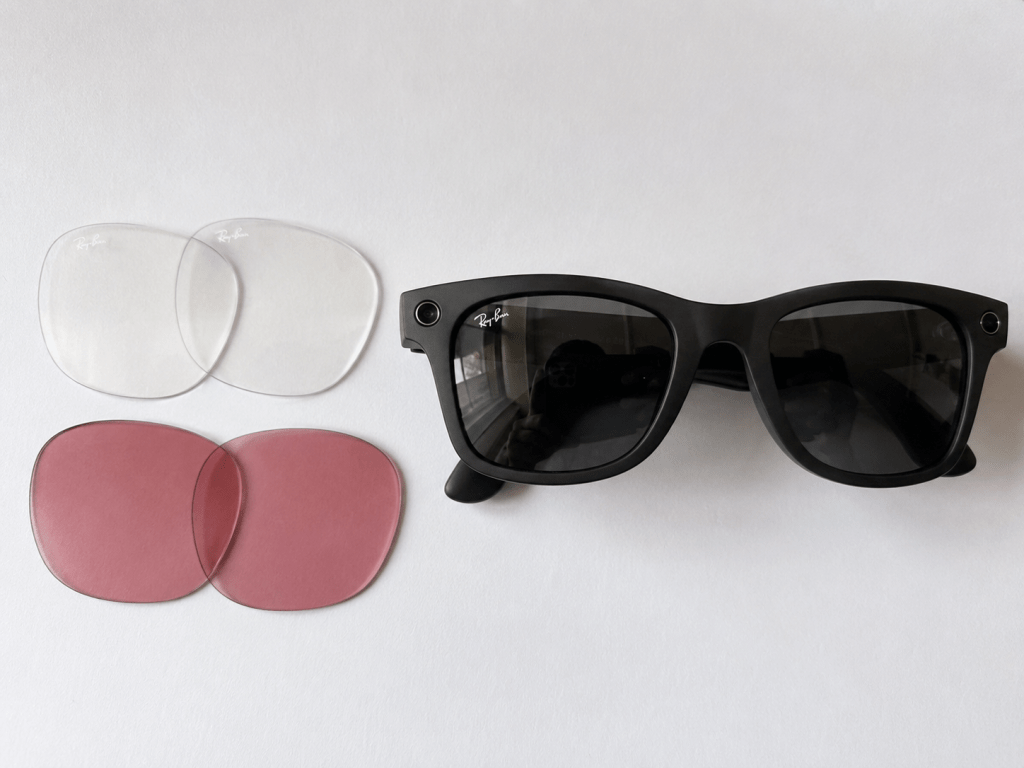
    A pair of Ray-Ban Meta smart glasses with the dark lenses installed, and clear and pink replacement lenses lying beside them, ready to be swapped in.

    Then I found replacement lenses online. The ones I bought were around $20 to $30, and I can swap them with a firm thumb push.

    I have clear lenses, dark lenses, and a rose-colored pair. The rose tint can help with contrast and glare. Even though I am blind, I still use the vision I have in some situations.

    I would also never buy them for a blind person as a surprise gift. They require charging and setup. Some people do not want to deal with this kind of technology at all.

    Said person should get a say before expensive technology shows up as a gift.

    Would I buy them again?

    Yes.

    They do not replace my phone and they are not a set of working eyeballs.

    But I keep reaching for them.

    They have stayed in rotation.

    That is probably my most honest review.

    Note: This is not a sponsored post, and it is not a technical review. It is just how the Ray-Ban Meta smart glasses have worked for me.

    Want a more detailed, technical review?

    If you want a deeper, more technical look, these are the best reviews I’ve found written for a blind and low-vision audience: